abue-ammar/tinycast — a trending Swift project
Tinycast — a tiny, fully native macOS launcher, hotkeys, and clipboard history.
abue-ammar/tinycast — Swift · 5,140 stars · 240 forks · +1,076 today
Tinycast — a tiny, fully native macOS launcher, hotkeys, and clipboard history.
Tinycast
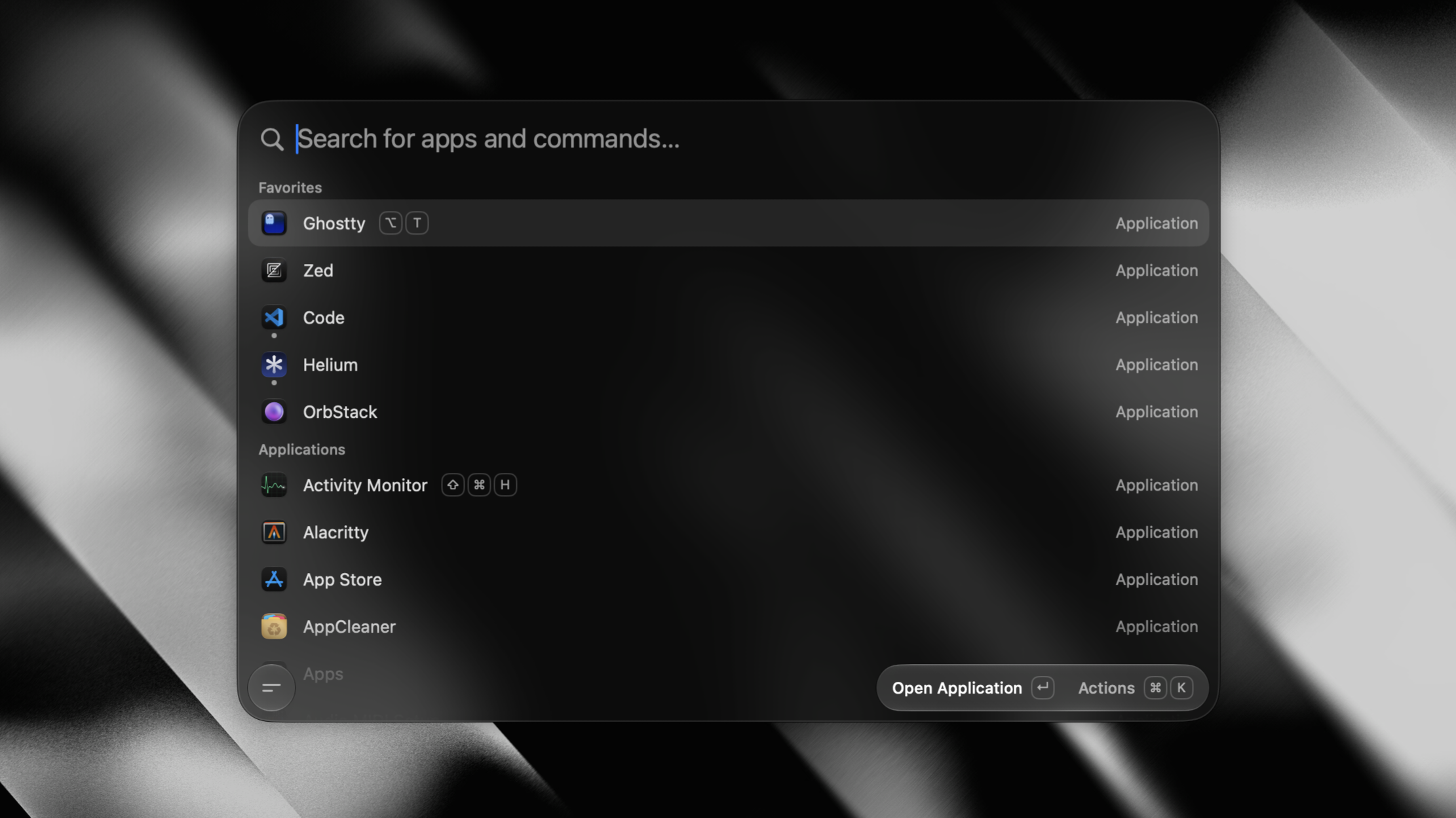
#A tiny, fully native macOS launcher. One hotkey, everything you reach for all day, under 100 MB of RAM.







SwiftUI and AppKit, zero third-party dependencies, no Electron and no telemetry. It also runs real Raycast extensions, rendered as native SwiftUI. Free, open source, and staying that way.
For anything private, email iabueammar@gmail.com.
Support
#Tinycast is free, and it stays that way. If it earns a place in your daily flow, a one-off tip helps keep it actively maintained. GitHub Sponsors isn't available in my country, so please support here:

Payments are handled securely by Polar.sh.
Features
#- App launcher — fuzzy-search and launch anything, pin favorites, see what's running, quit an app or every app at once.
- Global hotkey — one shortcut summons the palette from anywhere.
- Per-app hotkeys — bind a key to an app; press it to toggle (focus/hide).
- Search Files — open files and folders from the folders you choose, through Spotlight, with no index of our own.
- Clipboard history — text and images, searchable, pasted back into the app you were using.
- Calculator — do math, unit, live currency and crypto conversions inline, right in the palette.
- Quicklinks — turn a URL, search, file or deeplink into a command, with placeholders for typed input, the clipboard or the date.
- Apple Shortcuts — search and run the shortcuts you built in the Shortcuts app, with aliases and global hotkeys.
- Snippets — reusable Markdown templates with dynamic placeholders, arguments, nested references and optional keyword expansion.
- Custom commands — run named shell commands through fuzzy search or their own global hotkeys.
- Window management — 34 Rectangle-style actions: halves, quarters, thirds, sizing, nudging, display moves, fullscreen and Spaces.
- System actions — lock, sleep, restart, empty trash, toggle appearance, Bluetooth, mute, hidden files, and more.
- Calendar and meetings — your next meeting on the empty palette and in the menu bar, one key to join it, or let it join itself.
- Notes — an unlimited collection of plain Markdown files in one floating editor, searchable from the palette.
- Emoji picker — a searchable emoji grid, one keystroke away.
- AI chat — use your own key or an installed AI account, chat from the palette. Off out of the box, like every AI feature.
- Quick Actions — fix grammar, rewrite, translate or summarize the selected text in any app.
- Raycast extensions — run the ones you already have natively, rendered as SwiftUI.
- Backup and import — export your settings to a file, or import your setup from Raycast.
Install
#First, add the tap:
brew trust --tap abue-ammar/tinycast   # required for third-party taps
brew tap abue-ammar/tinycast
Then run the one line that matches your Mac:
| Your Mac | Install |
|---|---|
| Apple silicon, macOS 26 or newer | brew install --cask tinycast |
| Intel, macOS 26 | brew install --cask tinycast-universal |
| macOS 15 Sequoia (no longer maintained) | brew install --cask tinycast-sequoia |
Not sure which you have? Apple menu → About This Mac. Homebrew checks too, and refuses the wrong one.
Want early builds? brew install --cask tinycast@beta puts Tinycast Beta.app beside the stable
app, with its own settings and permissions. Apple silicon, macOS 26+.
Homebrew clears the macOS quarantine flag on every install and update, so there is nothing else to
run. Downloading a DMG from Releases instead?
Tinycast is self-signed, so clear the flag once:
xattr -dr com.apple.quarantine "/Applications/Tinycast.app".
Permissions
#Accessibility — needed when Tinycast pastes or expands text into another app, and the only permission snippet keyword expansion needs. You're prompted when you first use a feature that needs it; grant access in System Settings → Privacy & Security → Accessibility. Snippets ship disabled, and keystrokes are matched locally, never stored and never sent anywhere.
Using it
#- Open Settings → General and record a global shortcut to summon Tinycast.
- Press it anywhere → the palette floats in. Type to filter, ↵ to launch.
- Tab switches between Apps and Clipboard; ↑/↓ move, Esc dismisses.
- Settings → Shortcuts — search an app or custom command and record a global shortcut.
- Settings → Snippets — enable the feature, then create templates with expansion keywords.
Building from source
#See docs/development.md for the toolchain, build, packaging, release and website workflows. docs/ indexes everything else — architecture, engineering standards, the design system and one document per feature.
Contributing
#[!IMPORTANT] Open an issue before you write code — this is mandatory. Get the bug or the feature agreed on first; discussing it in the issue (or on Discord) is strongly encouraged. A PR that doesn't close an issue marked
approvedis closed automatically however good the patch is, and the work is wasted. Docs-only fixes are the one exception.Tinycast's feature set is deliberately closed, and "another launcher has it" is not a reason on its own. Ask whether a feature is wanted before you ask for it.
Read CONTRIBUTING.md first — it covers the memory budget every PR is held to, the before/after video requirement for visual changes, and why features get declined. Every PR fills in the pull request template. Security issues go through SECURITY.md, not the issue tracker.
Questions, ideas, or just want to follow along? Join the Discord.
License
#Content above is the README of abue-ammar/tinycast, reproduced from GitHub’s trending list. All rights remain with the original authors.
Newsletter
New posts in your inbox. Confirm by email, unsubscribe any time.
Keep reading

Custom Web Application Development for Schools and Colleges in Nepal
How a custom web application handles attendance, terminal results, fees and parent notices for a Nepali school or college, with a clear roles table.
Tarka raj Jaishi · 7 min
What Does a Full-Stack Developer Do? A Guide for Nepali Businesses
Follow a single customer order from a phone in Tikapur to the database and back, and see what a full-stack developer handles at every step.
Tarka raj Jaishi · 6 min
vorssaint/vorssaint-utils — a trending Swift project
Free and open-source macOS menu bar toolkit.
via GitHub · 8 min
bregman-arie/devops-exercises — a trending Python project
Linux, Jenkins, AWS, SRE, Prometheus, Docker, Python, Ansible, Git, Kubernetes, Terraform, OpenStack, SQL, NoSQL, Azure, GCP, DNS, Elastic, Network, Virtualization. DevOps Interview Questions
via GitHub · 31 min

Comments
Posting as a guest