Lakr233/vphone-cli — a trending Swift project
Lakr233/vphone-cli is trending on GitHub today.
Lakr233/vphone-cli — Swift · 13,115 stars · 1,572 forks · +907 today
vphone-cli
#Boot a virtual iPhone via Apple's Virtualization.framework using PCC research VM infrastructure.
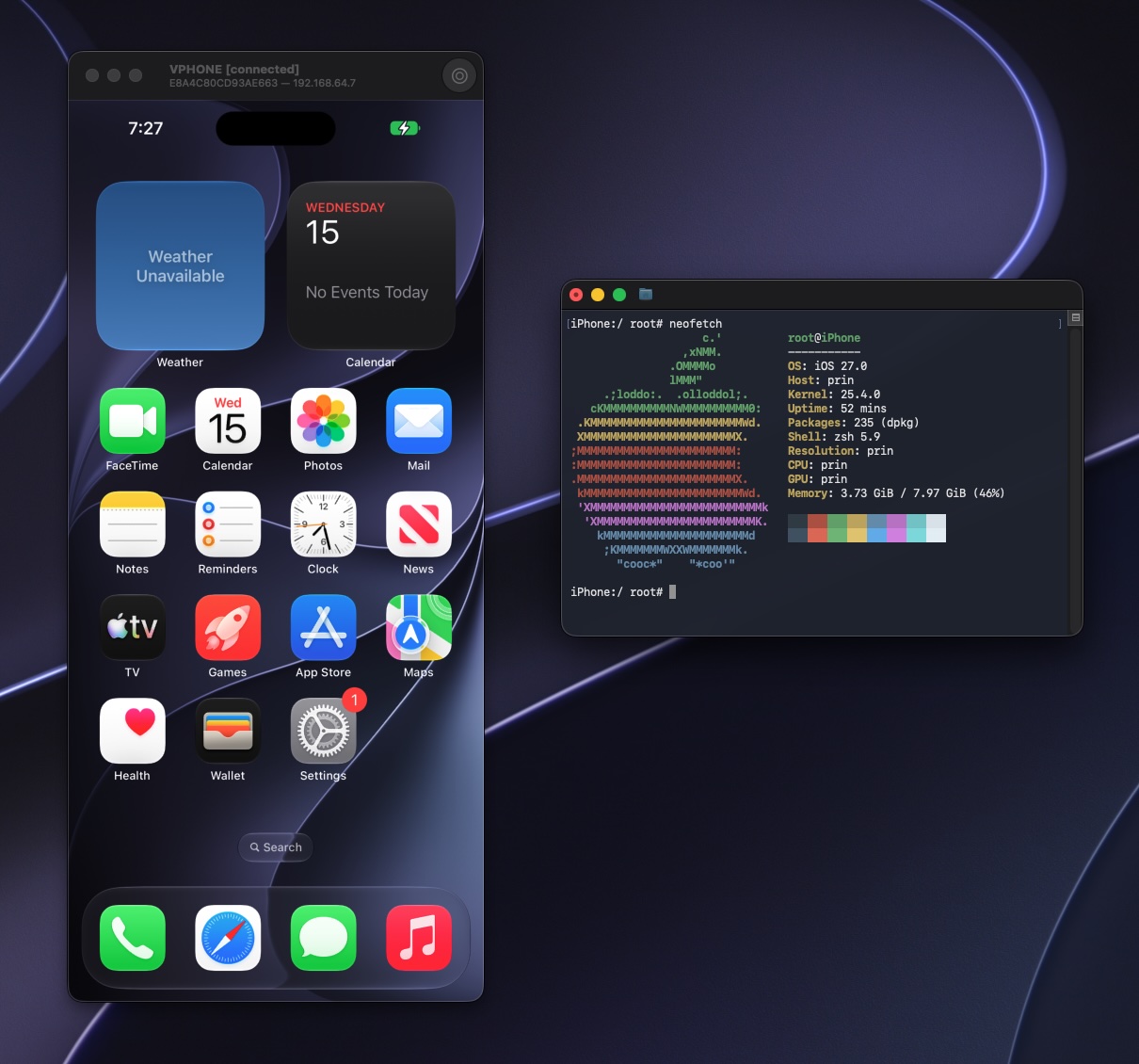
Prerequisites
#Host:
- Apple Silicon
- macOS 15+ (Sequoia)
- Xcode + iOS SDK (cross-compiles the guest daemon)
- SIP/AMFI relaxation to allow private PV=3 entitlements with unsigned-binary
Dependencies:
brew install python@3.13 aria2 wget gnu-tar openssl@3 ldid-procursus sshpass keystone cmake libusb ipsw zstd
Install
#brew install zqxwce/tap/vphone-cli
Build
#git clone --recurse-submodules https://github.com/Lakr233/vphone-cli.git
./scripts/setup_tools.sh # install deps, build toolchain submodules, create the Python venv
./scripts/build.sh # build + sign vphone-cli, bundle the .app, cross-compile vphoned
cd .build/vphone-cli.app/Contents/MacOS/
vphone-cli --help
Quick Start
#One command creates a VM end-to-end (download → patch → DFU restore → CFW install → first boot):
vphone-cli vm create myphone -V jb        # -V / --variant

vphone-cli vm launch myphone
Commands
#vphone-cli vm create runs the whole pipeline; the individual steps below let you drive it manually or re-run one stage.
Manage
#vphone-cli vm list # list VMs (--json for scripting)
vphone-cli vm info myphone # show one VM
vphone-cli vm new myphone # create an empty bundle (cpu/mem/disk options)
vphone-cli vm config myphone --cpu 8 --memory 8192
vphone-cli vm clone myphone myphone-2 # fast APFS clone, fresh device identity
vphone-cli vm export myphone --out myphone.tzst # zstd fast by default (--max = xz -9); --out may be a dir (auto-names <vm>.tzst/.txz); skips restore dir + staging files
vphone-cli vm import myphone.tzst --name restored
vphone-cli vm rename myphone iphone16
vphone-cli vm delete iphone16
Build a VM manually (what vm create automates)
#vphone-cli vm new myphone # 1. empty bundle
vphone-cli fw prepare myphone --iphone-version 26.1 # 2. download + merge IPSWs
vphone-cli fw patch myphone --variant jb # 3. patch the boot chain
vphone-cli vm launch myphone --dfu & # 4. boot into DFU (background)
vphone-cli restore myphone --get-shsh # fetch SHSH
vphone-cli restore myphone # DFU restore
vphone-cli vm stop myphone # stop the DFU boot
vphone-cli cfw install myphone --variant jb # 5. install CFW (host-mount; asks for sudo)
vphone-cli vm launch myphone # 6. first boot
Update to a newer iOS by pointing fw prepare at an IPSW: --iphone-source /path/to.ipsw --cloudos-source /path/to.ipsw.
Firmware Variants
#Five patch variants with increasing security bypass — pass one to --variant:
| Variant | Boot Chain | CFW | Notes |
|---|---|---|---|
less |
4 patches | 2 phases | Patchless — keeps iOS mitigations enabled |
regular |
42 patches | 10 phases | AMFI/SSV/Img4/TXM bypass |
dev |
53 patches | 12 phases | + TXM entitlement/debug bypass |
jb |
113 patches | 14 phases | + full jailbreak (Sileo, TrollStore auto-install on first boot) |
exp |
141 patches | 18 phases | JB superset + anti-VM-detection research patches |
See research/0_binary_patch_comparison.md for the per-component breakdown.
Running & Connecting
#- SSH (jailbreak):
ssh -p 22222 mobile@<vm-ip>(passwordalpine) - SSH (regular/dev):
ssh -p 22222 root@<vm-ip> - VNC:
vnc://<vm-ip>:5901
Locations
#Everything vphone-cli creates lives under ~/.vphone/ — kept outside the repo and the .app so the signed bundle stays portable. Redirect the whole tree with $VPHONE_ROOT:
| Path | Contents |
|---|---|
~/.vphone/ |
The per-user data root — override the entire location with $VPHONE_ROOT. |
~/.vphone/VMs/ |
VM bundles — one directory per VM. This is the library; override with $VPHONE_LIBRARY_ROOT. |
~/.vphone/ipsws/ |
Downloaded iPhone + cloudOS IPSWs, cached and reused across VMs. |
~/.vphone/tools/ |
Cached APFS seal-volume artifacts (apfs_sealvolume_<version>) fetched during fw prepare. |
~/.vphone/debs/ |
Cached .deb packages the jb/exp CFW install lays into the guest (Sileo, apt, …). |
~/.vphone/venv/ |
Auto-provisioned Python environment (see Python runtime; override with $VPHONE_VENV_DIR). |
Precedence: the per-item overrides ($VPHONE_LIBRARY_ROOT, $VPHONE_VENV_DIR) win over $VPHONE_ROOT, which wins over the ~/.vphone default. The ipsws/, tools/, and debs/ caches always sit directly under whichever root is active.
SIP/AMFI Relaxation
#Option A — fully disable SIP, then disable AMFI via boot-arg (most permissive).
In Recovery (long-press power → Terminal):
csrutil disable
csrutil allow-research-guests enable
Then reboot into macOS and set the AMFI boot-arg (needs SIP fully off to take effect):
sudo nvram boot-args="amfi_get_out_of_my_way=1 -v" # reboot after
Option B — keep SIP on (debug-only relaxed), then allowlist the binary with amfidont (leaves AMFI enabled system-wide).
In Recovery:
csrutil enable --without debug
csrutil allow-research-guests enable
Then reboot into macOS and:
vphone-amfidont # .build/vphone-cli.app/Contents/Resources/vphone-amfidont for local builds
Tested Environments
#| Host | iPhone | CloudOS |
|---|---|---|
| Mac16,11 27.0b2 | 17,3_18.6.2_22G100 |
26.1-23B85 |
| Mac16,8 26.5.1 | 17,3_26.0_23A341 |
26.1-23B85 |
| Mac16,8 26.5.1 | 17,3_26.0.1_23A355 |
26.1-23B85 |
| Mac16,12 26.3 | 17,3_26.1_23B85 |
26.1-23B85 |
| Mac16,12 26.3 | 17,3_26.3_23D127 |
26.1-23B85 |
| Mac16,12 26.3 | 17,3_26.3_23D127 |
26.3-23D128 |
| Mac16,12 26.3 | 17,3_26.3.1_23D8133 |
26.3-23D128 |
| Mac16,11 26.2 | 17,3_26.4_23E246 |
26.4-23E5207q |
| Mac16,11 26.2 | 17,3_26.5_23F77 |
26.4-23E5207q |
| Mac16,11 27.0b2 | 17,3_26.5.2_23F84 |
26.4-23E5207q |
| Mac16,6 26.4.1 | 17,3_26.6_23G71 |
26.4-23E5207q |
| Mac16,11 27.0b2 | 17,3_26.6.1_23G83 |
26.4-23E5207q |
| Mac16,6 26.6.1 | 17,3_26.6.2_23G90 |
26.4-23E5207q |
| Mac16,11 27.0b2 | 17,3_27.0_24A5380h |
26.4-23E5207q |
| Mac16,6 26.4.1 | 17,3_27.0_24A5390f |
26.4-23E5207q |
| Mac16,6 26.6.1 | 17,3_27.0_24A5408d |
26.4-23E5207q |
| Mac16,11 27.0b2 | 17,3_27.0_24A5418b |
26.4-23E5207q |
| Mac16,11 27.0b2 | 17,3_27.0_24A5424a |
26.4-23E5207q |
| Mac16,11 27.0b2 | 17,3_27.0_24A5430a |
26.4-23E5207q |
| Mac16,6 26.6.1 | 17,3_27.0_24A435 |
26.4-23E5207q |
FAQ
#zsh: killed ./vphone-cli — AMFI/debug restrictions aren't bypassed; see Prerequisites (amfi_get_out_of_my_way=1 or amfidont).
Virtualization is not available on this hardware — your Mac is itself a VM; PV=3 guest boot can't nest. Use a non-nested macOS 15+ host.
Stuck on "Press home to continue" — connect via VNC and right-click (two-finger click) to simulate the home button.
System apps won't install — during iOS setup, don't pick Japan or the EU as your region (extra regulatory checks the VM can't satisfy); pick e.g. United States.
App crashes on launch with EXC_GUARD / GUARD_TYPE_MACH_PORT — re-patch with vphone-cli fw patch <name> --variant <v> --force-exc-guard, then re-restore/install (#291). Always on for iOS 18 bases.
Install a .ipa/.tipa — use the running VM's Install menu (drag-drop or file picker).
cfw install hangs re-signing a system binary (e.g. Campo), memory climbing unbounded — known bug in ldid-procursus up to 2.1.5-procursus7 (the current Homebrew stable): bytes(uint64_t) calls __builtin_clzll(0) with no zero-guard, which is undefined behavior, and on this build resolves to a 0-length that underflows an unsigned loop counter — ldid spins writing one byte at a time into a growing buffer instead of terminating. Triggered by any entitlements plist containing an integer value of exactly 0 (some real Apple system binaries have these). Fixed upstream but not yet in a tagged release; rebuild from source: brew install --HEAD ldid-procursus && brew link --overwrite ldid-procursus. Kill the hung ldid process first (sudo kill -9 <pid>) if you already hit it.
Automation
#vphone-cli exposes a host control socket (<bundle>/vphone.sock) for programmatic control — screenshots, touch, swipes, hardware keys, clipboard — each action returning an inline screenshot for AI-driven E2E testing. See vphone-mcp for an MCP server wrapping it.
Acknowledgements
#Content above is the README of Lakr233/vphone-cli, reproduced from GitHub’s trending list. All rights remain with the original authors.
Newsletter
New posts in your inbox. Confirm by email, unsubscribe any time.
Keep reading
Custom Web Application Development for Schools and Colleges in Nepal
How a custom web application handles attendance, terminal results, fees and parent notices for a Nepali school or college, with a clear roles table.
Tarka raj Jaishi · 7 min
What Does a Full-Stack Developer Do? A Guide for Nepali Businesses
Follow a single customer order from a phone in Tikapur to the database and back, and see what a full-stack developer handles at every step.
Tarka raj Jaishi · 6 min
vorssaint/vorssaint-utils — a trending Swift project
Free and open-source macOS menu bar toolkit.
via GitHub · 8 min
bregman-arie/devops-exercises — a trending Python project
Linux, Jenkins, AWS, SRE, Prometheus, Docker, Python, Ansible, Git, Kubernetes, Terraform, OpenStack, SQL, NoSQL, Azure, GCP, DNS, Elastic, Network, Virtualization. DevOps Interview Questions
via GitHub · 31 min

Comments
Posting as a guest