QwenLM/qwen-code — a trending TypeScript project
An open-source AI coding agent that lives in your terminal.
QwenLM/qwen-code — TypeScript · 29,516 stars · 3,375 forks · +151 today
An open-source AI coding agent that lives in your terminal.


The open-source AI coding agent for your terminal, editor, desktop, browser, and chat.
中文 | Deutsch | français | 日本語 | Русский | Português (Brasil) | 한국어
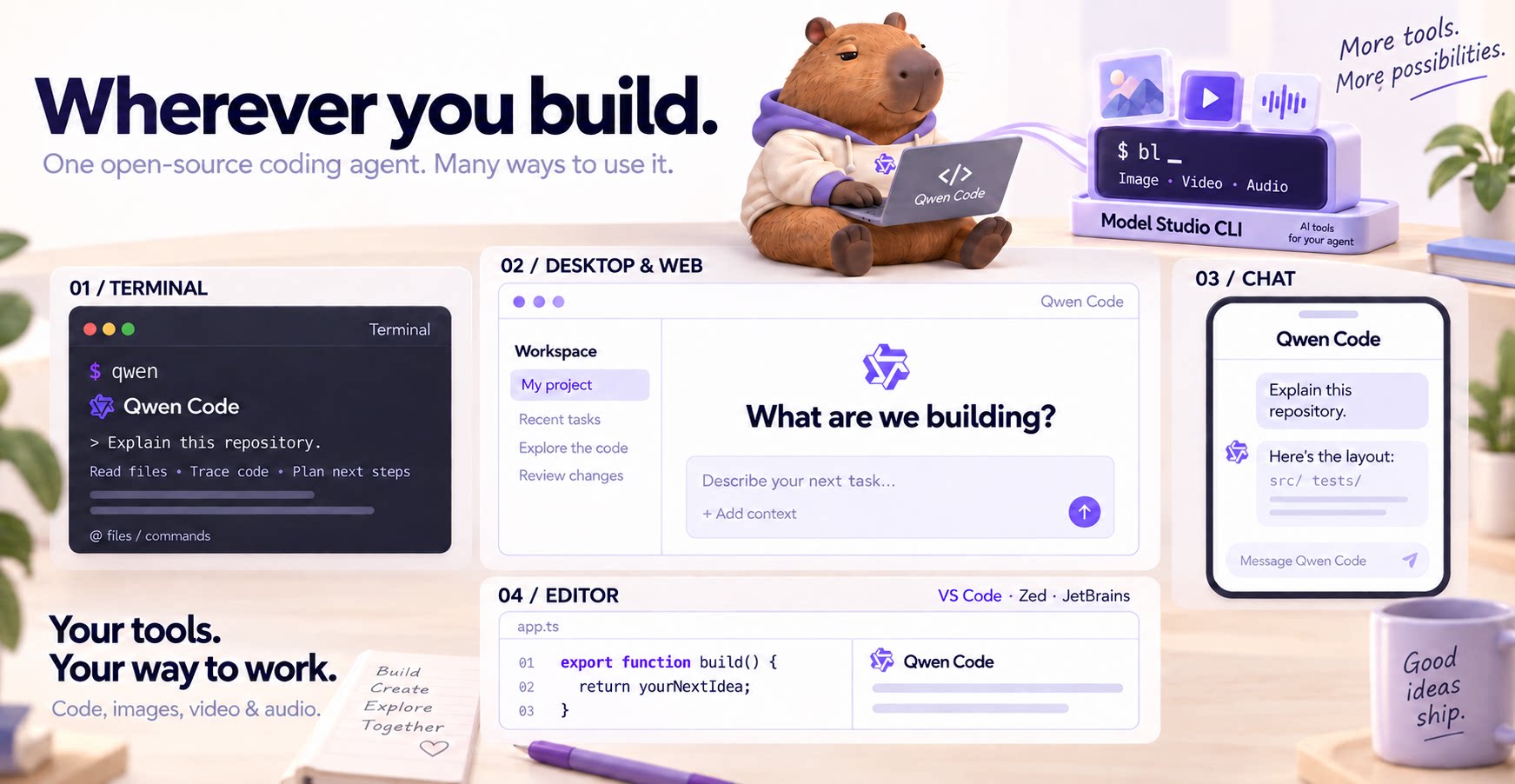
| Qwen Code 1.0 Preview |
|---|
| Qwen Code 1.0 Preview brings together the agent harness capabilities of Qoder and Qwen Code in an open-source release. Try Qwen Code 1.0 Preview · Documentation · 中文文档. |
Why Qwen Code?
#- Agentic out of the box — Auto-Memory, Auto-Skills, SubAgents, Agent Teams, and MCP. Dynamic workflows, zero setup.
- Open-source, inside and out — The framework and the Qwen models are open-source. They evolve together. No vendor lock-in.
- Multi-protocol — Supports OpenAI, Anthropic, Gemini, and Qwen APIs. Any third-party provider or local model (Ollama / vLLM). Switch at runtime.
- Beyond the terminal — IDE plugins, Desktop app, Web UI, SDKs, and chat integrations (Telegram / DingTalk / WeChat / Feishu).
[!TIP] Qwen Code is actively iterating on itself — using its own agent and models to file issues, submit PRs, review code, and run tests. Powered by the community, driven by AI.
Installation
#Looking for Qwen Code 1.0 Preview? Get started here. The instructions below are for the main version.
Linux / macOS:
curl -fsSL https://qwen-code-assets.oss-cn-hangzhou.aliyuncs.com/installation/install-qwen-standalone.sh | bash
Windows:
irm https://qwen-code-assets.oss-cn-hangzhou.aliyuncs.com/installation/install-qwen-standalone.ps1 | iex
NPM / HomebrewRestart your terminal after installation to ensure environment variables take effect.
NPM (requires Node.js 22+):
npm install -g @qwen-code/qwen-code@latest
Homebrew (macOS / Linux):
brew install qwen-code
Quick Start
#Open a terminal in your project and start Qwen Code:
cd /path/to/your-project
qwen
Inside the session, run /auth and choose Qwen Account with Subscription to sign in with your Plus or Pro subscription, or configure a provider with an API key. Then try:
Explain this repository and show me where to start.
See the Authentication Guide and Settings Reference for detailed setup.
See the terminal interface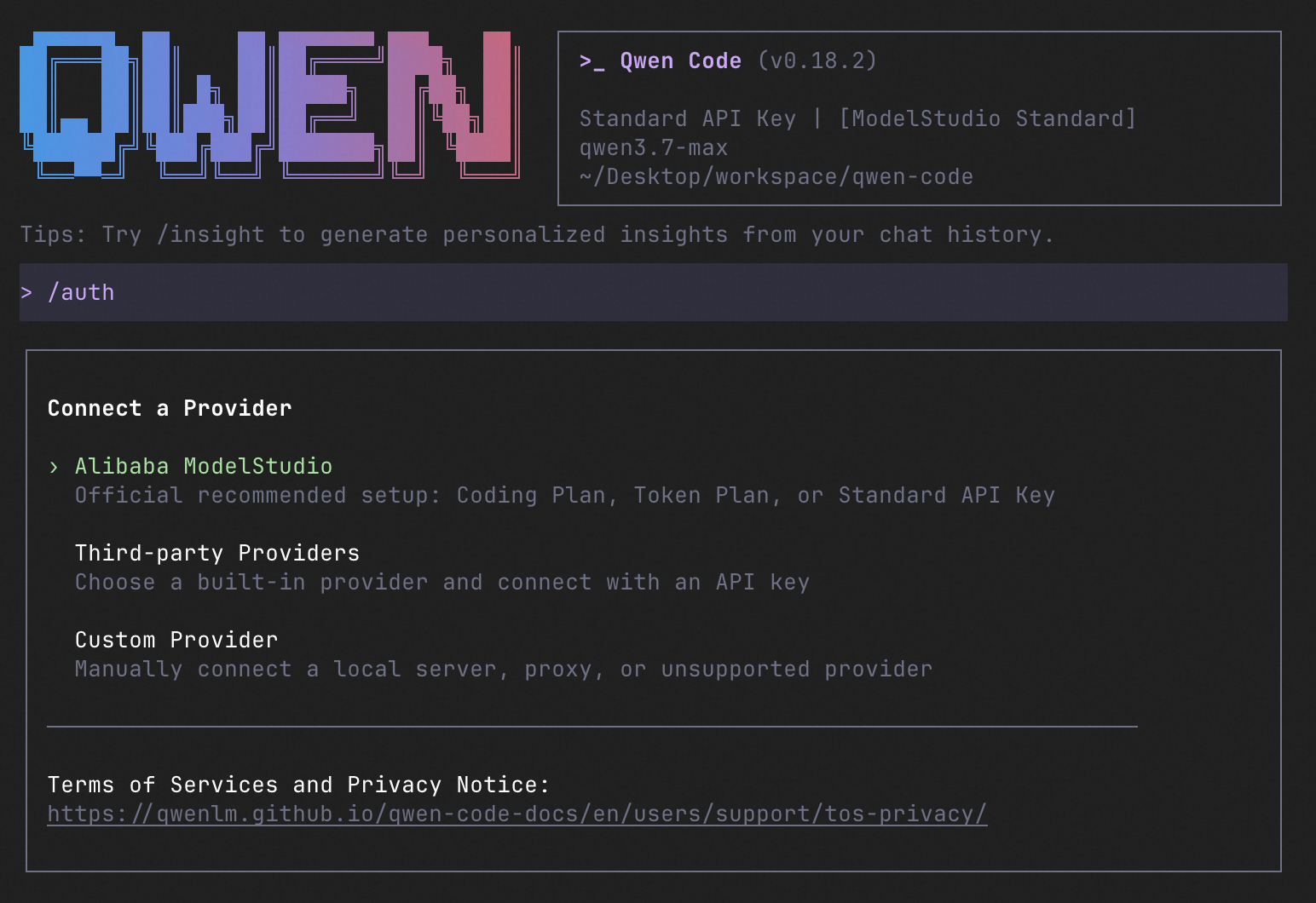
How to Use Qwen Code
#Choose the interface that fits your workflow:
| Interface | Get started |
|---|---|
| Terminal | Run qwen in your project — see Quick Start. |
| Desktop | Download Qwen Code Desktop for macOS, Windows, and Linux. |
| Web | Run qwen serve --open to open the Web UI in your browser. (experimental) |
| Editor | Set up VS Code, Zed, or JetBrains. |
| Chat | Connect Telegram, DingTalk, WeChat, or Feishu, then run qwen channel start. |
For automation and custom integrations:
- Headless — Run
qwen -p "..."in scripts, CI/CD, or batch jobs. - SDKs — Build with TypeScript, Python, or Java.
- Daemon — Run
qwen serveto connect clients over HTTP + SSE (ACP). (experimental) Daemon guide. - Computer Use — Set up native MCP tools or Node REPL + SDK in Qwen Code, Claude Code, or Codex.
import asyncio

from qwen_code_sdk import is_sdk_result_message, query


async def main() -> None:
    result = query(
        "Summarize the repository layout.",
        {
            "cwd": "/path/to/project",
            "path_to_qwen_executable": "qwen",
        },
    )

    async for message in result:
        if is_sdk_result_message(message):
            print(message["result"])


asyncio.run(main())
Daemon Mode
#Run Qwen Code as a long-lived service when you want browser, editor, SDK, and automation clients to share agent sessions without each starting a separate process. The daemon provides the built-in Web Shell and an HTTP + SSE API, supports multiple workspaces, and lets clients reconnect to active sessions.
Start it in the foreground and open the Web Shell:
qwen serve --open
The default address is http://127.0.0.1:4170. To run and manage it in the background instead:
qwen daemon start
qwen daemon status
qwen daemon logs -f
qwen daemon stop
By default, the daemon listens on loopback without bearer authentication; any local process that can reach it can use the full API, including code execution. On shared or untrusted hosts, set QWEN_SERVER_TOKEN and use --require-auth. See the Daemon guide for workspaces, authentication, remote access, and the API.
Capabilities
#If you know Claude Code, you already know Qwen Code — and then some. We've put significant effort into bringing Qwen Code to feature parity with Claude Code, improving both breadth and reliability across the board.
| Feature | Qwen Code | Claude Code |
|---|---|---|
| SubAgents, Agent Teams, Dynamic Workflows | ✓ | ✓ |
| Auto-Memory, Auto-Skills, Hooks | ✓ | ✓ |
| Built-in Skills (/review, /batch, /loop, /bugfix…) | ✓ | ✓ |
| MCP, Plan Mode, LSP Integration | ✓ | ✓ |
| Auto Mode, Sandbox, Git Worktrees | ✓ | ✓ |
| Computer Use (desktop automation) | ✓ | ✓ |
| IDE Plugins (VS Code / JetBrains / Zed) | ✓ | ✓ |
| SDK | ✓ | ✓ |
| Headless Mode, Session Management | ✓ | ✓ |
| Open-source — model and framework | ✓ | — |
| Multi-protocol (OpenAI / Anthropic / Gemini / Qwen + any provider) | ✓ | — |
| Agent Arena (multi-model head-to-head on same task) | ✓ | — |
Daemon Mode — qwen serve (multi-client shared agent) |
✓ | — |
| IM Channels (Telegram / DingTalk / WeChat / Feishu) | ✓ | — |
Qwen Code Evaluation
#On SWE-bench Verified, seven Qwen Code versions scored 76.40%–77.80% on average using the same Qwen 3.7 Max model (500 tasks, three trials per version).
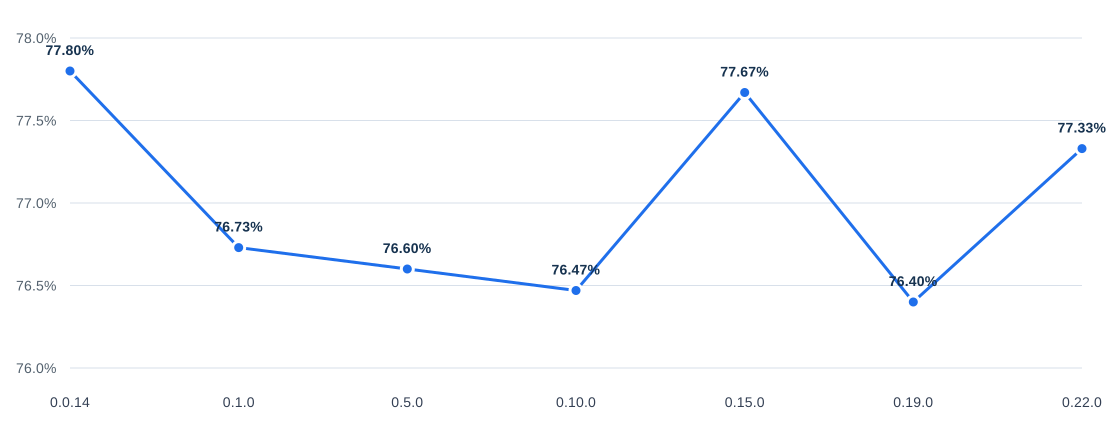
Full results and evaluation configuration →
Ecosystem
#Qwen Code Desktop — Official desktop app for macOS, Windows, and Linux
AionUi — A modern GUI for command-line AI tools including Qwen Code
Gemini CLI Desktop — A cross-platform desktop/web/mobile UI for Qwen Code
qwen-audio-agent — Realtime full-duplex voice frontend for Qwen Code over ACP — talk hands-free with barge-in and a local wake word
🦞 Qwen Code Claw — Let other agents (Claude, Codex, etc.) delegate coding tasks to Qwen Code via ACP. Paste this prompt into your agent:
Use Qwen Code as a coding agent. First, fetch and read this skill reference:
https://raw.githubusercontent.com/QwenLM/qwen-code/refs/heads/main/.qwen/skills/qwen-code-claw/SKILL.md
Then follow the instructions inside to install, authenticate, and use Qwen Code via acpx for all coding tasks.
- Aliyun Model Studio CLI — Official CLI for Aliyun's AI platform (
bailian-cli). Extends Qwen Code with image/video generation, knowledge retrieval, app orchestration, and model deployment
Privacy
#See the Terms of Service and Privacy Notice, including Chrome extension and Browser Use data handling.
Contributing
#Contributions are welcome! See CONTRIBUTING.md for guidelines.
Acknowledgments
#This project was originally based on Google Gemini CLI v0.8.2. We gratefully acknowledge the Gemini CLI team's excellent work. Starting from Qwen Code v0.1, we stopped syncing with upstream and began independent development as a multi-protocol, multi-platform agent framework with deep integrations for Qwen models and beyond.
Content above is the README of QwenLM/qwen-code, reproduced from GitHub’s trending list. All rights remain with the original authors.
Newsletter
New posts in your inbox. Confirm by email, unsubscribe any time.
More in Web Development
View allag-ui-protocol/ag-ui — a trending TypeScript project
AG-UI: the Agent-User Interaction Protocol. Bring Agents into Frontend Applications.
via GitHub · 4 min
ChromeDevTools/chrome-devtools-mcp — a trending TypeScript project
Chrome DevTools for coding agents
via GitHub · 2 min
louislam/uptime-kuma — a trending JavaScript project
A fancy self-hosted monitoring tool
via GitHub · 3 min
backnotprop/plannotator — a trending TypeScript project
The workspace to stay in the loop and on top of agents - shape, decide, plan, annotate, review code, share with team, and send all feedback to agents with one click.
via GitHub · 2 min

Comments
Posting as a guest